YouTube thumbnail size: videos and Shorts
Sizes in 10 seconds
| What | Size | Aspect ratio |
|---|---|---|
| Regular video thumbnail | 1280×720 px (enough for any screen) | 16:9 |
| Shorts thumbnail | 1080×1920 px (vertical video and cover) | 9:16 |
| Channel banner* | 2560×1440 px, at least 2048×1152 | 16:9 |
| Channel avatar* | square, for example 800×800 px | 1:1 |
* We did not find banner and avatar sizes in YouTube Help at the time of writing; the figures come from third-party guides. Check the channel settings in YouTube Studio.
Regular videos: what YouTube Help says
- The thumbnail aspect ratio is 16:9.
- The minimum width is 640 px. Help now recommends 3840×2160, but 1280×720 with the same 16:9 ratio looks the same and weighs less.
- Format: JPG or PNG.
- File size: up to 2 MB from a phone and up to 50 MB from a computer. If you upload from mobile, keep the file within 2 MB.
Tip: in the feed a thumbnail is a small picture. Anything smaller than a large headline is unreadable there.
Shorts: 9:16 video and thumbnail
Shorts are vertical videos at 1080×1920 (9:16). You can get a thumbnail in two ways: pick a frame from the video or upload your own image. According to Help, uploading your own picture is only available in YouTube Studio on a computer and on a verified channel; on a phone you can pick a frame.
- The aspect ratio of an uploaded thumbnail is 9:16.
- The minimum height is 640 px; Help now recommends 2160×3840, but 1080×1920 with the same ratio works fine.
- Format: JPG or PNG, up to 50 MB from a computer.
A horizontal thumbnail does not suit Shorts: they play full-screen on a phone, so a 16:9 image gets cropped or letterboxed.
Safe zones
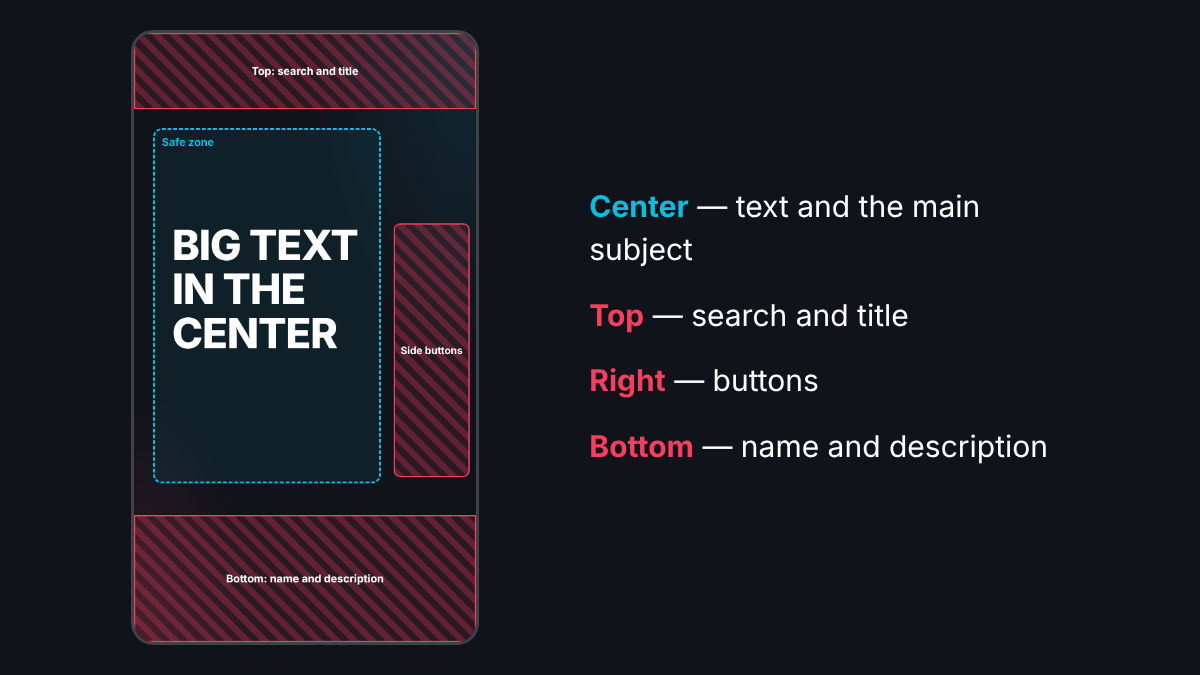
YouTube does not publish exact safe zones, so these are practical guidelines. Keep the important parts in the center and stay away from the edges.
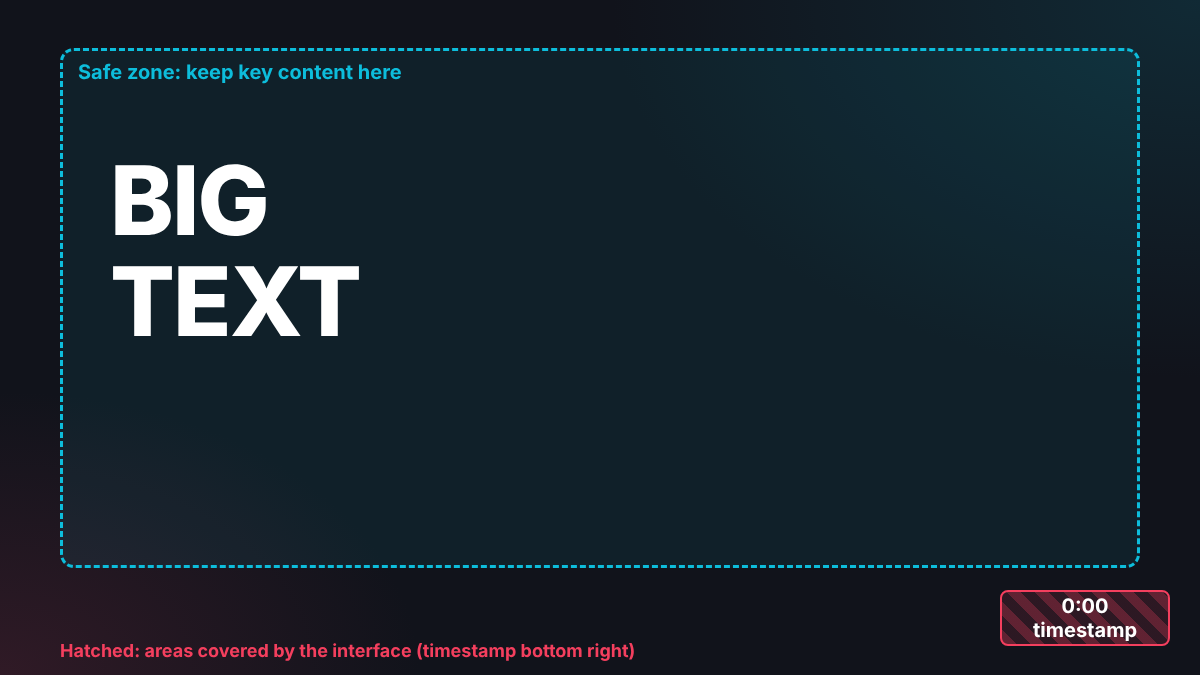
- 16:9: the timestamp covers the bottom right corner, so do not put words there.
- 9:16: the title, channel name and description overlap the top and bottom, and the buttons overlap the right side. Keep the text in the central part.
- On a small screen the edges can be trimmed, so leave 5–10% margin on every side.
Text on the cover
Few words, a large font and strong contrast: that is how a cover stays readable in the feed and in recommendations. Two to four words are enough; the video title tells the rest. Not sure what to write? See what to write on an OG image: the headline formula works for YouTube covers too.
Common mistakes
- Text near the bottom right corner of a thumbnail: the timestamp covers it.
- A tiny font: on a phone feed it turns into a grey blur.
- A horizontal image for Shorts: you get margins or cropping.
- Too many words and small details: the eye has nothing to catch.
- Weak contrast: light text on a light background.
- A file over 2 MB when uploading from a phone.
How to make it in OG Studio in 30 seconds
- Open the editor and choose the 16:9 format for YouTube (1280×720) or the Shorts format (1080×1920, 9:16). Need another size? Pick “Custom size” (Pro only).
- Enter a topic: AI suggests headline options and the cover is ready in 30 seconds.
- Pick a template and a color, upload your own photo if you like.
- Download the PNG and upload it as the thumbnail. More on the YouTube and YouTube Shorts format pages.
On the Free plan the image carries an “OG Studio” mark; Pro removes it. Sizes for other platforms are in Image sizes for social media 2026.
FAQ
What size is a YouTube thumbnail?
16:9, for example 1280×720 px; the minimum width is 640 px. JPG or PNG. When uploading from a phone, the file must not exceed 2 MB.
What size is a YouTube Shorts thumbnail?
A vertical 9:16 image, for example 1080×1920 px; the minimum height is 640 px. Your own image is uploaded in YouTube Studio on a computer.
Can I upload a Shorts thumbnail from my phone?
According to YouTube Help, a custom Shorts thumbnail can only be added in YouTube Studio on a computer. On a phone you can pick a frame from the video.
Will one image work for both a video and a Short?
No, the aspect ratios differ: 16:9 and 9:16. Make two versions of one design: in OG Studio you switch the format in a couple of clicks.
Why is part of the text on my thumbnail not visible?
The timestamp covers the bottom right corner, and in Shorts the interface overlaps the edges of the picture. Keep the text in the center.